Production rate fell
Compare it with the starting value under similar feed-water temperature and composition. Check the water supply and pretreatment on site.
Ecosoft Econnect
Check your system status, receive alarm alerts and review reading history in RODMS.
Training, start-up assistance, RODMS and SIM are included in the system price.
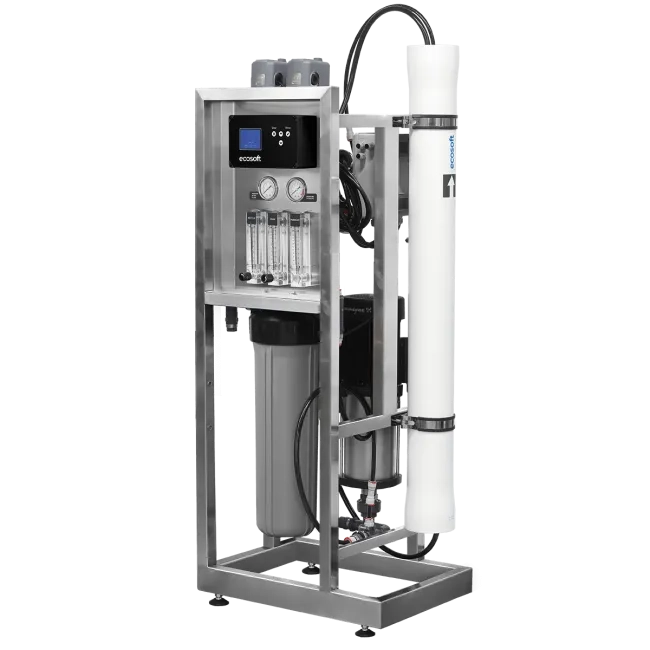
In the photo — Inox IoT MO6500TI6, an example of a reverse osmosis system
What exactly is Econnect?
OC6100 is the controller on the system. It controls the pump and valves. RODMS is the web portal. It shows status and history. The Inox IoT MO6500TI6 pictured is one compatible system example.
For a new site, the system is selected for the water and required capacity. Retrofitting an existing RO system can be considered after checking its controller, sensors and control cabinet.
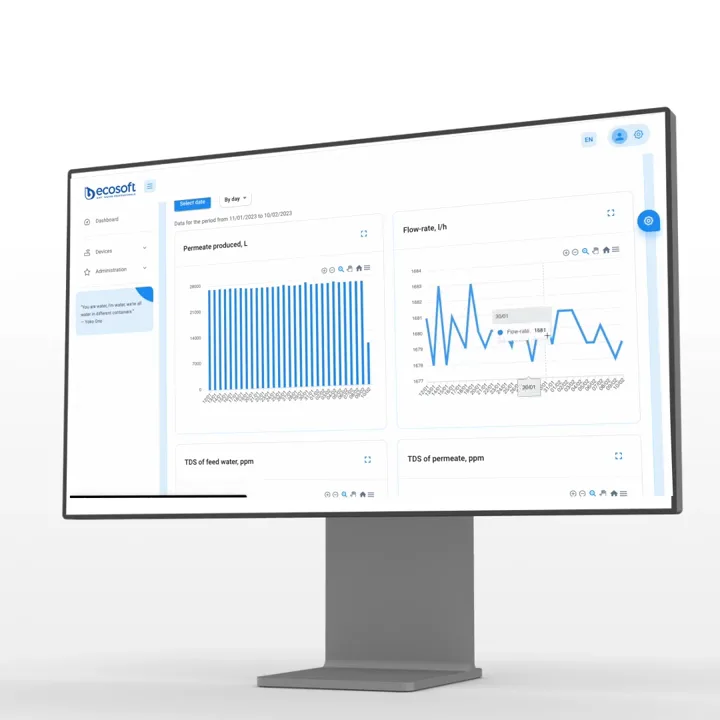
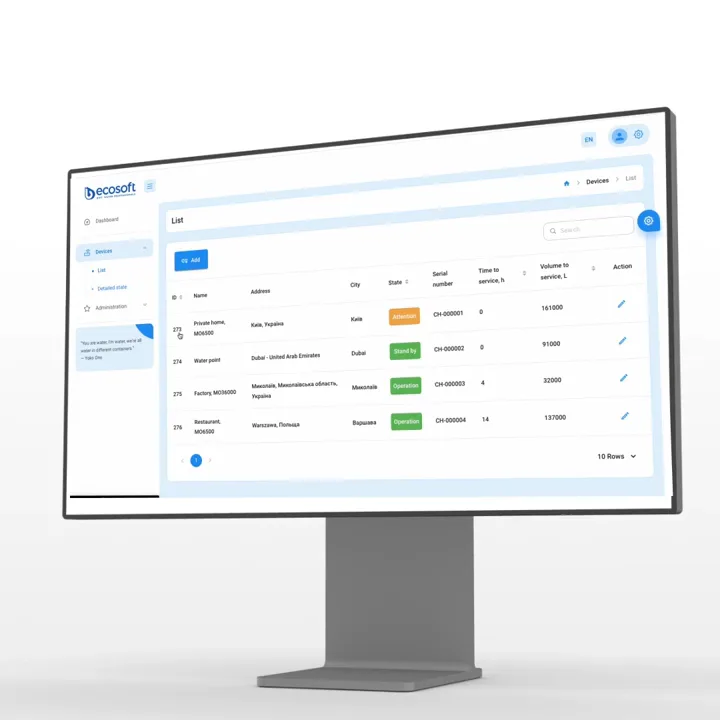
Archival frames from an Ecosoft promotional video. The interface and readings may differ from the current RODMS version.
Check operating mode, performance, water readings and history in the remote-monitoring web portal. Plan maintenance by time and produced volume.
RODMS / Detailed Status
Explore the demo portal without an account: open the pages on the left and the detailed-status tabs to see system readings, events and signals. Request a tour of the current portal
Training example: history and service counters are illustrative; 280 L/h comes from the MO6500 calculation, not telemetry.
Demo system 01 OC6100 controller
Loading demo readings…
Learning scenario · simulated data
Follow four steps: the diagram, controller display and RODMS demo will change together.
Start with “Operation”, or open “Signal” to see the protective stop and flow-rate chart.
Illustrative example: DEMO-01 · low inlet pressure · 09:15.
Note the time, review status and history in RODMS, then determine the cause on site.
This is a learning simulation, not a real service case. The guidance explains the specialist’s actions; it is not an automatic diagnostic feature of RODMS.
Three more learning examples
The history helps you decide where to start, but it does not diagnose the cause automatically.
Compare it with the starting value under similar feed-water temperature and composition. Check the water supply and pretreatment on site.
Compare feed-water TDS, temperature and operating mode. Share the history with a specialist if the change persists.
Check connectivity and power at the site. Without a mobile connection, the portal and SMS receive no new data.
Video by Ecosoft
Watch Ecosoft’s overview of the Econnect system.
Watch on YouTubeYour first RO project
Training, assistance with commissioning and reverse osmosis system setup, RODMS access and SIM are included in the system price. We agree the configuration and commissioning format for your site.
Prepare an enquiryWater analysis, required litres per hour and per day, water use and installation location. For an existing RO system, provide the model, controller and photos of its configuration.
Pretreatment, membrane, sensors, flushing options, installation and connection. Retrofitting an existing system requires a separate compatibility check.
During start-up, learn to read the indicators, record initial values and check dashboard access and SMS. Identify the person responsible for service and your support contact.
Describe the task and share water analysis and site details when available. During start-up, record baseline readings and agree who responds to alerts.
Helps with selection, training and start-up, and creates RODMS access. Agree on its involvement, post-launch contact and support process for your project.
An industrial reverse osmosis system purifies water. The controller runs the process and records readings. RODMS helps you monitor the plant and act in time.
For specialists
Start with a practical service scenario, then explore the modes in the diagram below.
Purifies water for process needs. The design and capacity of the industrial reverse osmosis system are selected for the site's needs and feed-water composition.
The reverse osmosis system controller automatically switches modes, monitors sensors, responds to alarms and stores operating data locally.
Remote monitoring shows status, history, charts and time to service for the owner and service team.
| Task | On site · OC6100 | Remotely · RODMS |
|---|---|---|
| Control | Controls the pump and valves, runs flushing and protective shutdown. | Shows the current state. Remote commands are not yet available. |
| Data | Reads sensors and stores operating data locally. | Shows history, charts and service counters once data is transmitted. |
| Alarm | Responds to a protection signal on site. | Sends RODMS and SMS alerts when connectivity is available. |
Interactive process diagram
Switch modes manually or run the sequence after the tank fills: two 60-second flushes with a countdown. The diagram shows flows, valves and sensor signals at each stage.
Level-switch signal, valve positions and explanations are shown below the diagram.
Contact support
RUNNING Production: 280 L/h --:--During production, the valves beside the rotameters set recirculation and drain flow rates. The rotameters show flow in each branch.
MO6500 calculation example: Feed: 3.0 bar, 20 °C and 1500 mg/L; operating pressure: 10.1 bar; permeate recovery: 75.6%; permeate: 104 mg/L, concentrate: 5824 mg/L. These values were calculated for NaCl and are not OC6100 telemetry.
Screen mockup based on the supplied photos. Operating values come from the MO6500 NaCl calculation, not the controller; other states are illustrative. Flush time counts down after a stage is selected, while standby time counts up.
250 L/h is the nominal rating of the Inox IoT example; 280 L/h comes from a separate MO6500 calculation for specified water and membrane conditions. System selection requires a calculation based on your water analysis.
Illustrative single-vessel reverse osmosis diagram. During purification, all permeate enters the tank. The flush pump and first-portion discharge valve are shown as options; availability depends on configuration. The automatic demo simulates a full-tank signal and two 60-second flushes; actual durations and discharge conditions depend on system settings.
Access to RODMS is defined by a role. The end owner sees his installation, the dealer and the service team work with the fleet of his branch.
The installation state, productivity, water settings and work history are available in one place.
List of devices, emergency events and a separate list of installations requiring maintenance.
OC6100 / LOCAL CONTROL
OC6100 is a reverse osmosis system controller: it controls the pump and valves, responds to sensor signals and stores operating data locally. Readings reach RODMS over 4G LTE.
Photo setup example. The controller integration can be different.
OC6100 transmits data over 4G LTE. The system is supplied with an international SIM card; remote access requires an active mobile data connection and 4G LTE coverage. If the connection drops, the controller stores operating data locally and sends it after the connection is restored.
The manufacturer may change the supplied configuration, including the SIM card. Confirm the current package contents and mobile service terms with Ecosoft before ordering. Discuss connectivityAn example of reverse osmosis installation
MO6500TI6 is one example of a commercial reverse osmosis system. Its nominal capacity is 250 L/h; it has a Grundfos CM 1-10 pump and a stainless steel frame. An OC6100-compatible system and configuration are selected for the site's water and needs.
View MO6500TI6250 L/h is the nominal rating of the Inox IoT example; 280 L/h comes from a separate MO6500 calculation for specified water and membrane conditions. System selection requires a calculation based on your water analysis.
About commissioning and setting up a reverse osmosis system, alerts and everyday operation.
Training and start-up assistance are included in the system price. Mention that this is your first RO project when contacting us: agree the training format, start-up involvement and service contact process. RODMS supplies data for inspection; a specialist draws the engineering conclusions.
Training, start-up assistance, RODMS and the SIM card are included in the system price. Ask the quotation to show the price of the monitored configuration versus a comparable system without monitoring, and to list sensors, installation and future service separately. The manufacturer may change the configuration and supply terms.
The access period, SMS allowance, renewal terms and any recurring charges must be confirmed in the written quotation for your system. Ask for these details before ordering.
Training and start-up assistance are included in the price. Agree on whether support is on site or remote, who installs and configures the system, and whom to contact after start-up before you order.
No. Inox IoT MO6500TI6 is one example. Confirm the OC6100-compatible models, capacity range and standard sensors for your configuration in the quotation. Ask for options to be identified separately and for compatibility with your site to be checked.
An OC6100-equipped system is supplied with an international SIM card. Remote monitoring requires an active mobile data connection, 4G LTE coverage and a RODMS account. The Ecosoft team creates the initial access.
The OC6100 controls purification and local protection on site. Loss of internet is not a stop command: RODMS data updates pause. The controller stores data locally and uploads it when the connection returns. SMS is also unavailable without a mobile network.
Alerts are available in RODMS and by SMS. During start-up, agree the recipients, check their numbers and verify receipt of a test message. Delivery depends on connectivity.
Remote monitoring is currently available. Remote start, stop and parameter-change commands are not yet available; they are planned for the future. Current control is local. Which systems are visible in RODMS depends on the user’s role.
Mode and digital signals, permeate flow, feed-water and permeate TDS and temperature, production volumes and service counters. Measurements depend on the installed sensors. Drain and recycle rotameters are read on site; these flows and the calculated pressures in the diagram are not RODMS readings.
It counts time and volume until the configured service interval. It helps schedule maintenance but does not determine the membrane’s actual condition. A specialist compares flow rate, water quality and operating conditions to reach a conclusion.
Retrofit feasibility is assessed separately. Send the system and controller models, a diagram, sensor list and a photo of the control cabinet. Ecosoft can then assess compatibility and required changes.
Thresholds and service intervals are agreed when the specific system is configured. RODMS and SMS deliver alerts, but do not imply continuous monitoring by Ecosoft. Define who responds and how to contact support during start-up.
Compare the readings with baseline values in the same mode: feed-water temperature and TDS, and permeate flow and TDS. On site, check the water supply, pretreatment and whether the agreed membrane-flushing mode has run. One reading cannot establish the cause; if the change persists or there is an alarm, send the history to a service specialist.
Please contact Ecosoft to create an account. The unit is then linked by the controller's serial number and IMEI. Connection instructions are provided by the Ecosoft team.
Planning your first RO project? Describe the task. We will help determine the required capacity, propose a configuration and explain the budget and start-up steps. For an existing system, we will check retrofit options.
Training, start-up assistance, RODMS and SIM are included in the system price.
You can provide water analysis and equipment photos later. Ask for the proposal to state the configuration, prices with and without monitoring, RODMS/SIM/SMS term, renewal terms and support contact separately.
 RUNNING